
Olimex MSP430-H2618
Support for the Olimex MSP430-H2618 board
Support for the Olimex MSP430-H2618 board

MCU
| MCU | TI MSP430F2618 |
|---|---|
| Family | MSP430 |
| Vendor | Texas Instruments |
| Package | 64 QFN |
| RAM | 8 KiB |
| Flash | 116 KiB |
| Frequency | 16 MHz |
| FPU | no |
| Timers | 2 (2x 16bit) |
| ADCs | 1x 8 channel 12-bit |
| UARTs | 2 |
| SPIs | 2 |
| I2Cs | 1 |
| Vcc | 1.8 V - 3.6 V |
| Datasheet MCU | Datasheet MSP430F2618 |
| User Guide MCU | User Guide MSP430F2xx |
| Datasheet Board | Datasheet Olimex MSP430-H2618 |
| Website | Website Olimex MSP430-H2618 |
Warning: While erasing or writing to the flash, the MCU must be powered by at least 2.2 V
Schematics
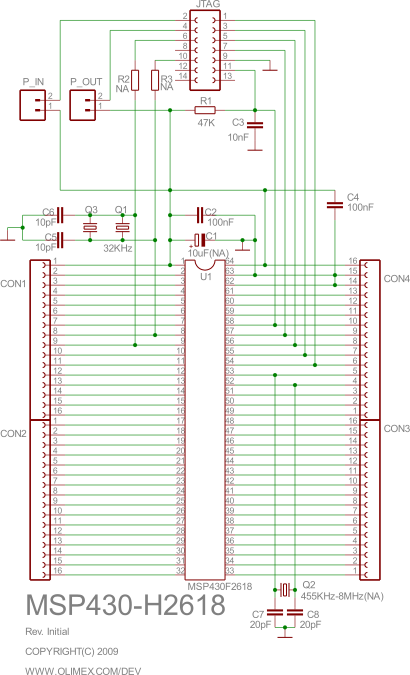
Pinout
The 64 pins on the edges of the PCB are connected to the corresponding MCU pins. Hence, the following pinout of the naked MSP430-F2618 MCU chip matches the pinout of the header board:

Flashing RIOT

Connect the board to a JTAG debugger supported by mspdebug; by default the Olimex MSP430-JTAG-Tiny (as shown in the picture above) is assumed, which is among the less expensive options.
Note: If you are not using the Olimex MSP430-JTAG-Tiny (or a compatible
programmer), set MSPDEBUG_PROGRAMMER to the correct value via
an environment variable or as parameter to make. E.g. use
make BOARD=olimex-msp430-h2618 MSPDEBUG_PROGRAMMER=bus-pirate to
flash using the bus pirate.
Warning: You can power the board via the JTAG programmer by placing a
jumper at P_IN. However, the JTAG programmer will only be able
to provide a limited current. You may want to disconnect the
header board from devices consuming a lot of power prior to
flashing.
Warning: If the board is powered externally, make sure to place the jumper
in P_OUT position, not in P_IN position.
Warning: A jumper in P_OUT is mutually exclusive to a jumper in P_IN.
Never connect both at the same time.
Note: Pin 1 on the JTAG connector has a small white triangle next to it and square pad, compared to the round pad used by all other JTAG pins.
Warning: The Olimex MSP430-JTAG-Tiny will fail to flash or debug the board until the latest firmware is installed. For that, install the Windows-only programmer software and update the DLLs files to contain the latest firmware as described in the website. The software will update the programmer upon launch.
Once the jumper is correctly placed in either P_IN or in P_OUT and the
JTAG cable is connected just run
BOARD=olimex-msp430-h2618 make flashUsing the shell
stdio is available via the UART interface with TXD = P3.6
(pin 35 on the header) and RXD = P3.7 (pin 34 on the header) at 115,200 Baud.
The easiest way is to connect an USB TTL adapter (such as the cheap cp210x
or ch341 based adapters) as follows:
TTL adapter    Olimex MSP430-H2618-----------    -------------------
       GND --- 63 (DV_SS)       TXD --- 35 (P3.7)       RXD --- 34 (P3.6)