
Atmel SAM D21 Xplained Pro
Support for the Atmel SAM D21 Xplained Pro board.
Support for the Atmel SAM D21 Xplained Pro board.
Overview
The SAMD21 Xplained Pro is an ultra-low power evaluation board by Atmel
featuring an ATSAMD21J18A SoC. The SoC includes a SAMD21 ARM Cortex-M0+ micro-
controller. For programming the MCU comes with 32Kb of RAM and 256Kb of flash
memory.
Hardware
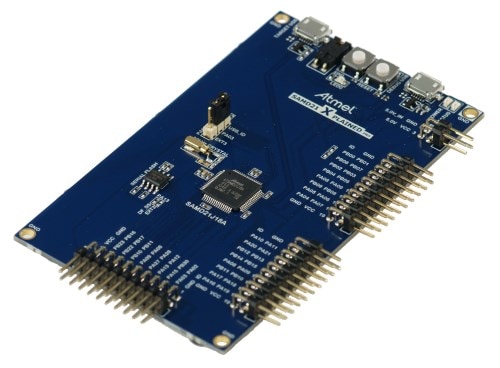
MCU
| MCU | ATSAMD21J18A |
|---|---|
| Family | ARM Cortex-M0+ |
| Vendor | Atmel |
| RAM | 32Kb |
| Flash | 256Kb |
| Frequency | up to 48MHz |
| FPU | no |
| Timers | 5 (16-bit) |
| ADCs | 1x 12-bit (20 channels) |
| UARTs | max 6 (shared with SPI and I2C) |
| SPIs | max 6 (see UART) |
| I2Cs | max 6 (see UART) |
| Vcc | 1.62V - 3.63V |
| Datasheet | Datasheet |
| Board Manual | Board Manual |
User Interface
1 User button and 1 LED:
| Device | PIN |
|---|---|
| LED0 | PB30 |
| SW0 (button) | PA15 |
Implementation Status
| Device | ID | Supported | Comments |
|---|---|---|---|
| MCU | samd21 | yes | |
| Low-level driver | GPIO | yes | |
| ADC | yes | ||
| PWM | yes | ||
| UART | yes | ||
| I2C | yes | ||
| SPI | yes | ||
| USB | yes | ||
| RTT | yes | ||
| RTC | yes | ||
| Timer | yes |
Flashing the device
Connect the device to your Micro-USB cable using the port labeled as DEBUG USB.
The standard method for flashing RIOT to the samd21-xpro is using edbg. by calling:
make BOARD=samd21-xpro -C tests/leds flashNote that on Linux, you will need libudev-dev package to be installed.
Users can also use openOCD to flash and/or debug the board using:
PROGRAMMER=openocd make BOARD=samd21-xpro -C tests/leds flashOn Linux you will have to add a udev rule for hidraw, like
echo 'KERNEL=="hidraw*", SUBSYSTEM=="hidraw", MODE="0664", GROUP="plugdev"' \ | sudo tee -a /etc/udev/rules.d/99-usb.rulessudo service udev restartArch Linux
With yaourt:
yaourt -S libudev0yaourt -S hidapi-gityaourt -S openocd-git# edit PKGBUILD, add "cmsis-dap hidapi-libusb" to "_features"Ubuntu
Although this refers to setting up the SAMR21, this guide is still very helpful to understanding how to set up a solid RIOT development environment for the SAMD21: http://watr.li/samr21-dev-setup-ubuntu.html