
Atmel SAM L21 Xplained Pro
Support for the Atmel SAM L21 Xplained Pro board.
Overview
The SAML21 Xplained Pro is an ultra-low power evaluation board by Atmel
featuring a ATSAML21J18A SoC. The SoC includes a SAML21 ARM Cortex-M0+ micro-
controller. For programming the MCU comes with 32Kb of RAM and 256Kb of flash
memory.
The saml21-xpro is available from various hardware vendors for ~50USD (as of oct. 2015).
Please note: ATMEL’s most recent SAML21s are the B variant, or
ATSAML21J18B. Because the driver changes are mostly small, throughout this
reference the device will continue to be referred to as the ATSAML21J18[A/B]
indiscriminately;
Hardware
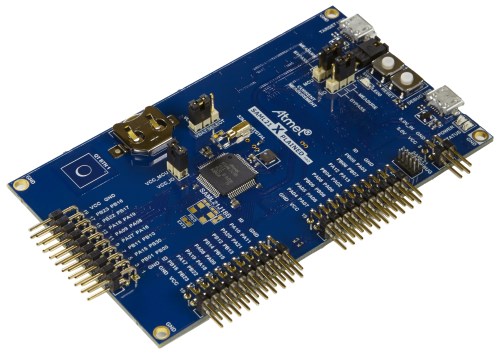
MCU
| MCU | ATSAML21J18A |
|---|---|
| Family | ARM Cortex-M0+ |
| Vendor | Atmel |
| RAM | 32Kb |
| Flash | 256Kb |
| Frequency | up to 48MHz |
| FPU | no |
| Timers | 8 (16-bit) |
| ADCs | 1x 12-bit (20 channels) |
| UARTs | max 6 (shared with SPI and I2C) |
| SPIs | max 6 (see UART) |
| I2Cs | max 6 (see UART) |
| Vcc | 1.8V - 3.6V |
| Datasheet | Datasheet |
| Board Manual | Board Manual |
User Interface
1 User button and 1 LED:
| Device | PIN |
|---|---|
| LED0 | PB10 |
| SW0 (button) | PA02 |
Implementation Status
| Device | ID | Supported | Comments |
|---|---|---|---|
| MCU | saml21 | yes | |
| Low-level driver | GPIO | yes | |
| PWM | yes | ||
| UART | yes | ||
| I2C | yes | ||
| SPI | yes | ||
| USB | yes | ||
| RTT | yes | ||
| RTC | yes | ||
| RNG | yes | ||
| Timer | yes | ||
| ADC | yes | ||
| DAC | yes |
Flashing the device
Connect the device to your Micro-USB cable using the port labeled as EDBG.
The standard method for flashing RIOT to the saml21-xpro is using edbg.
by calling: make BOARD=saml21-xpro -C tests/leds flash
Note that on Linux, you will need libudev-dev package to be installed.
Users can also use openOCD to flash and/or debug the board using:
PROGRAMMER=openocd make BOARD=saml21-xpro -C tests/leds flash
On Linux you will have to add a udev rule for hidraw, like
bashecho 'KERNEL=="hidraw*", SUBSYSTEM=="hidraw", MODE="0664", GROUP="plugdev"' \ | sudo tee -a /etc/udev/rules.d/99-usb.rulessudo service udev restartArch Linux
With yaourt:
yaourt -S libudev0yaourt -S hidapi-gityaourt -S openocd-git# edit PKGBUILD, add "cmsis-dap hidapi-libusb" to "_features"Ubuntu
Although this refers to setting up the SAMR21, this guide is still very helpful to understanding how to set up a solid RIOT development environment for the SAML21: http://watr.li/samr21-dev-setup-ubuntu.html